Here are the new features in version 2.18.0.
Would you like to learn more about TAG Application and get further information?

Notification panel – Integrated filters and new enhancements
Thought the enhancements to the notification panel were over? Well… not at all!
With this new release, the web panel entirely dedicated to notifications becomes even more powerful and detailed, yet also more simple and intuitive!
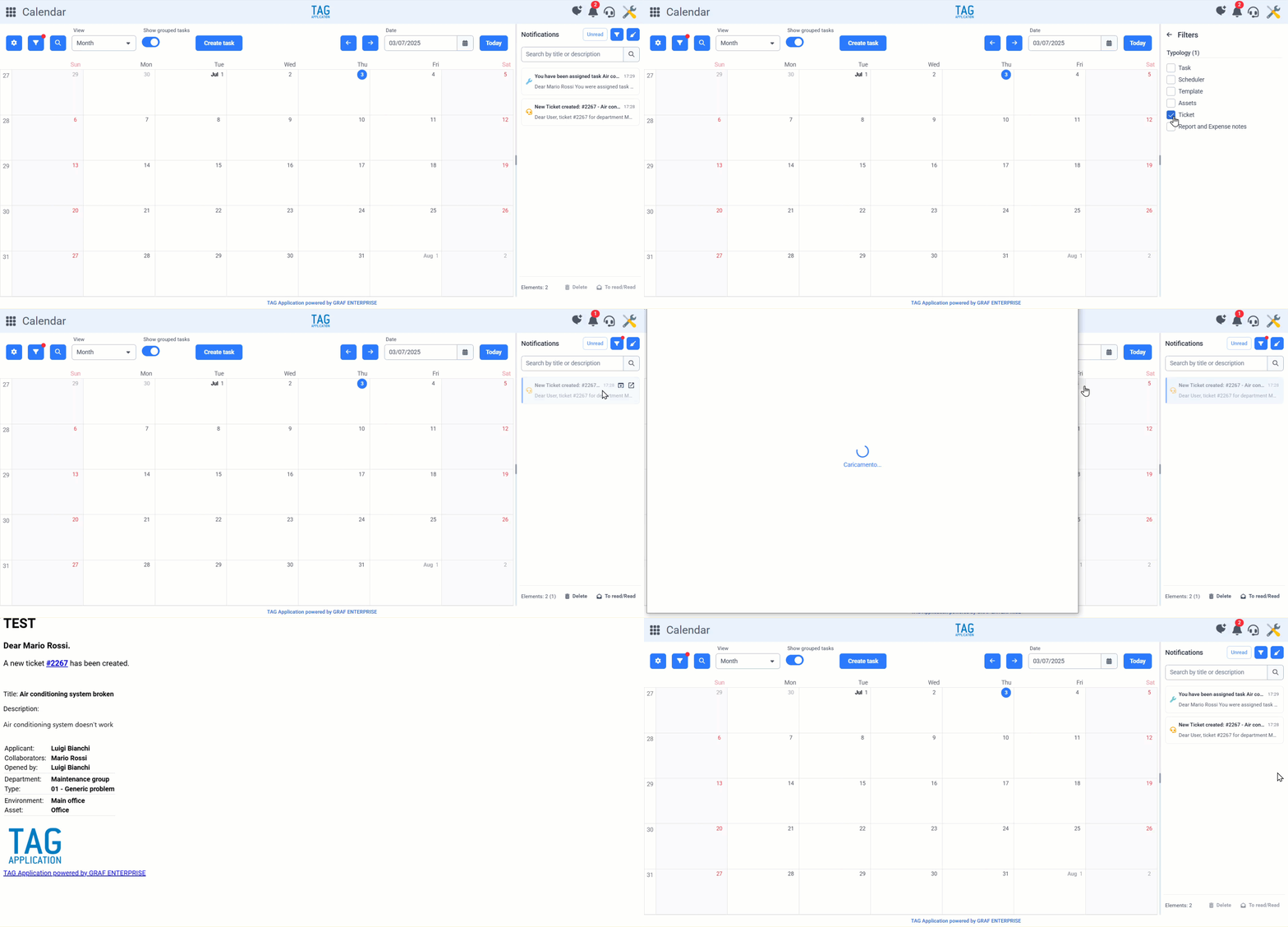
The most relevant upcoming change is undoubtedly the integration of filters. Now, using the classic funnel icon, you can access an interface where you can select which type of notifications to display, making it easier to manage and categorize incoming messages.
Another key update is the new behavior when clicking on a notification. From now on, left-clicking a notification tile will not only select it, but also mark it as “read.” To access the entity related to the notification, you can still click the open-in-new-window icon. But now, a new feature allows you to view the full details of the notification via the first icon, offering a more comprehensive overview.
All this to make the notification panel increasingly rich and functional, essential for centralizing communications and managing them easily from a single dedicated point!
(fig 1.0)