Here are the news in version 1.79.0
Would you like to find out more about TAG Application and have more information?

Notifications – Inserting start and end dates in task assignment notifications
When you receive a notification, it is important to take in all the key information through a quick reading.
Specifically, in the work environment, it is essential to know what to do, when and whom to refer to when needed.
Precisely in terms of immediacy and greater ease of understanding, task assignment notifications have been enhanced with the inclusion of start and end dates immediately in evidence.
Thus, with the new update, opening any assignment email notification will show the following information regarding the activity:
– Title
– Description
– Start Date
– End Date
– Assigned by
– Responsible party
– Applicant
– Type
– Asset
– Environment
– Ticket

Consultations – Cost Elimination
The ability to work 360 degrees across multiple modules is one of the pivotal objectives of TAG Application:
allowing users to take advantage of most of the functionalities without continuously navigating within the system is fundamental.
In this regard, the Consultations have been optimized with an important enhancement:
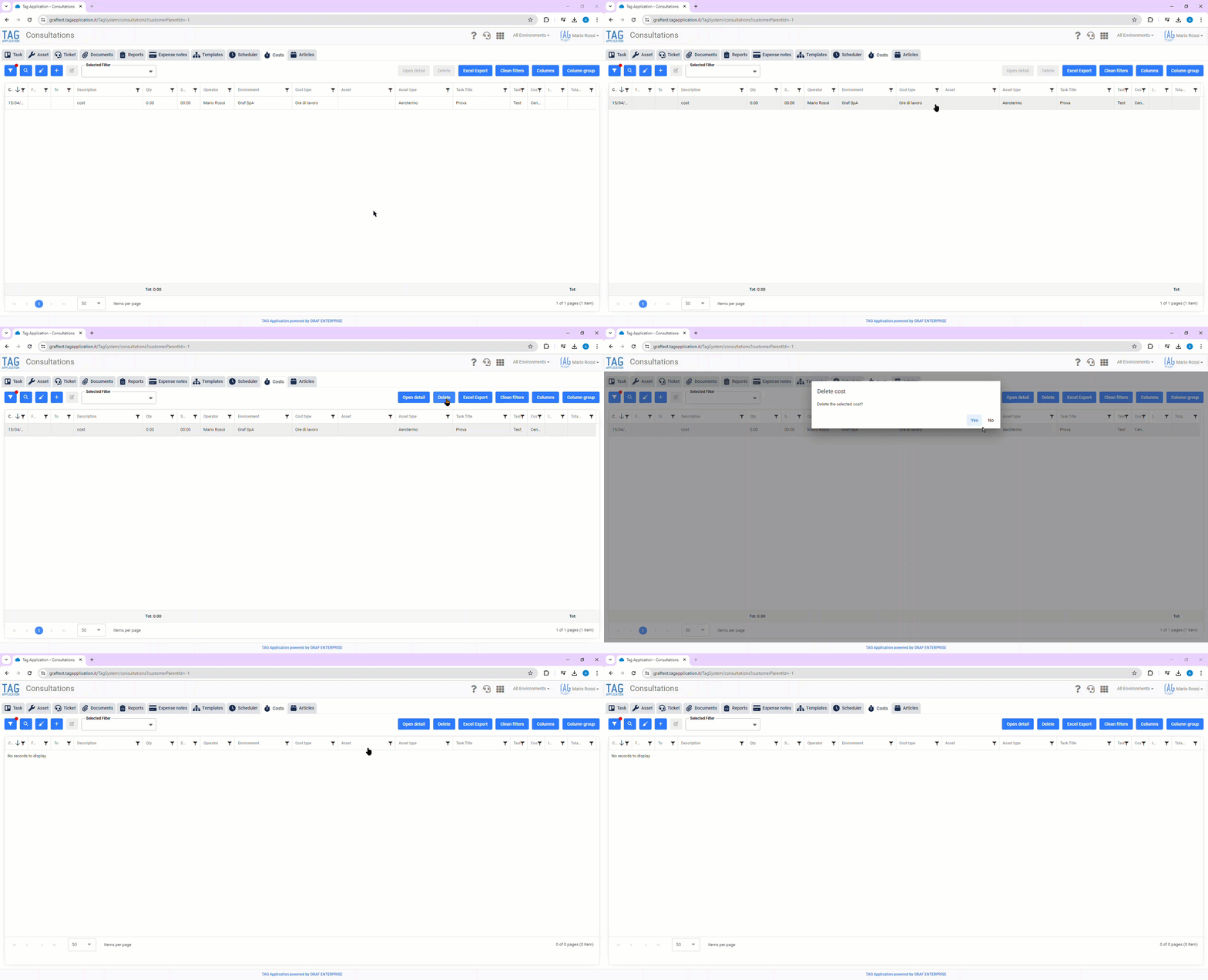
starting from this version, it becomes possible to eliminate costs directly from the appropriate section of the module, without the obligation to first enter inside the specific activity detail.
Selecting the row related to a specific cost will activate the blue “Open Detail” and “Delete” buttons at the top right:
through the former the detail will be opened, while the latter (provided there are no non-deletable relationships) will directly delete the selected cost.
(fig 1.0)

Task – Closing task without reading the NFC tag
By now it is known: TAG Application lays its foundation on NFC technology to help the operator, track assets and ensure that checks are properly performed.
In some cases, however, being forced to read the Tag to close an asset can be a limitation, a constraint that one might want to eliminate.
To overcome limitations of this nature, TAG Application will become even more flexible:
with the new version, in fact, closing activities by reading the Tag will no longer be a constraint, but just a simple preference.
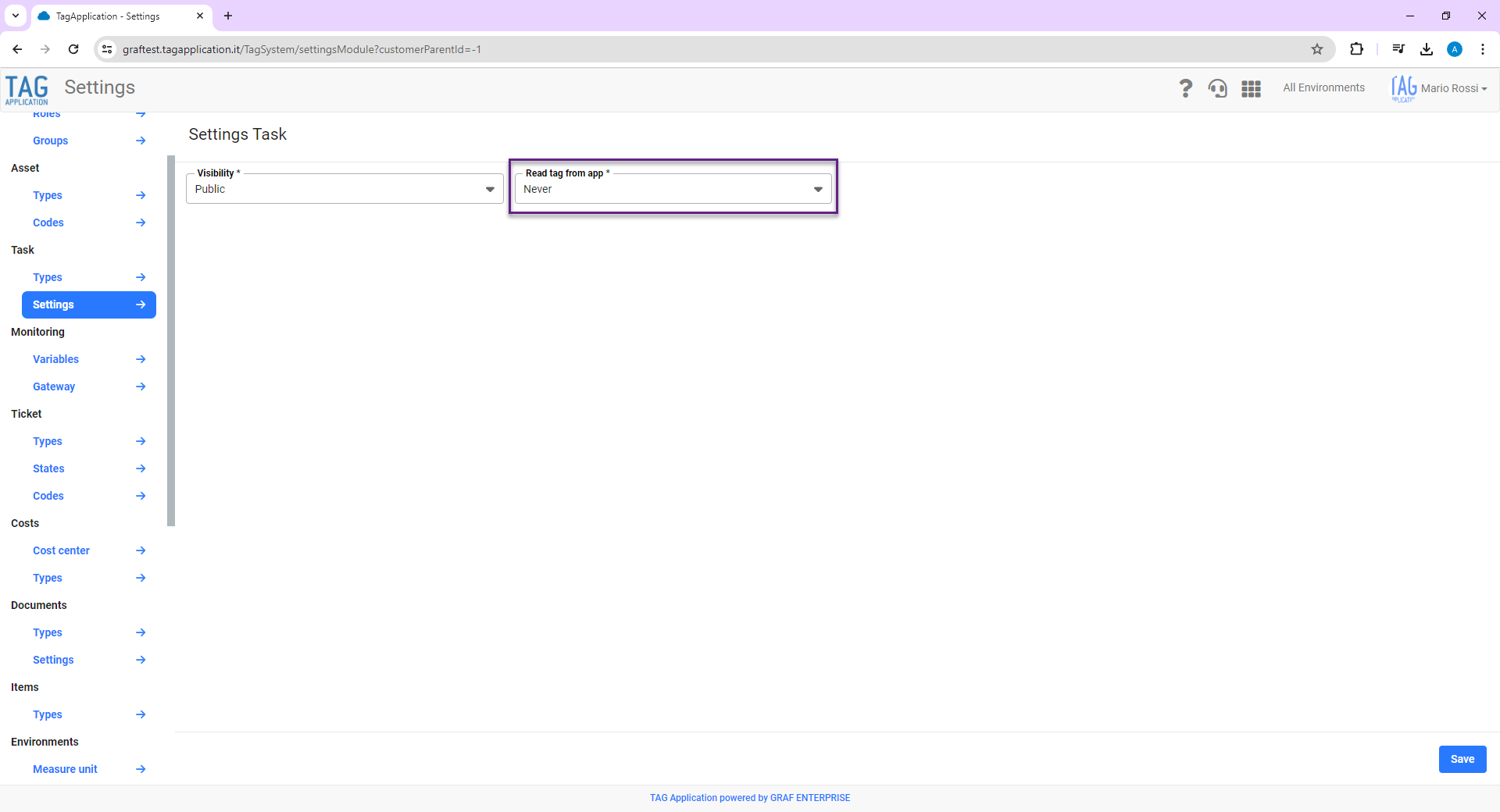
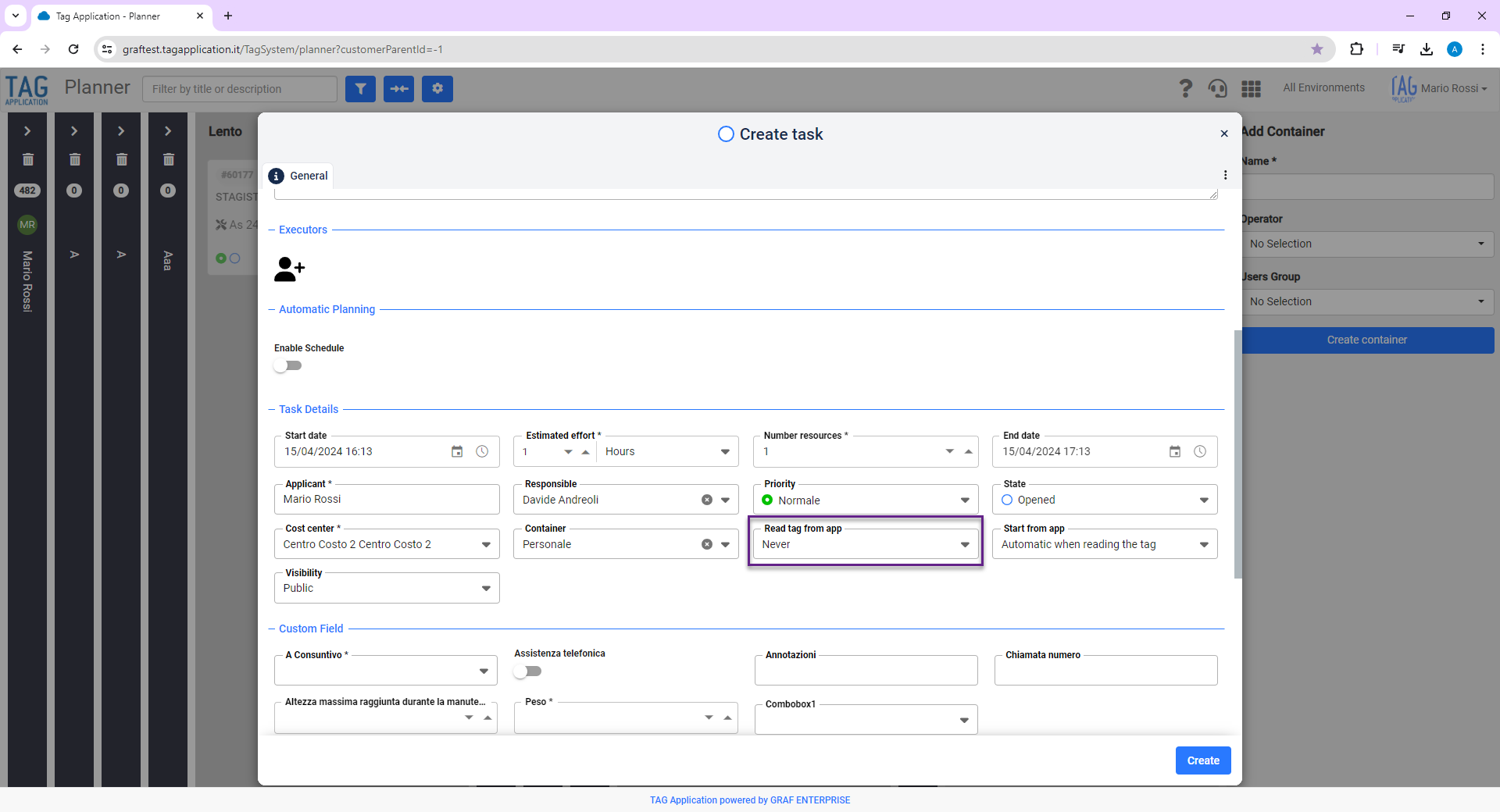
From the Settings module, in the “Activity – Settings” section, you will now be able to access the “Reading Tag from app” dropdown and choose an option between
“On opening and closing,” “Never,” and “Only on opening.”
This preference will function as a pre-selection of the same “Read tag from app” field present in all activities and will be individually editable within the detail of each.
By choosing “Never” all of the convenient features of NFC technology will remain active and functioning, with the only difference being that when closing activities there will no longer be a requirement to read the Tag.
(fig 2.0 – 2.1)

Ticket – Deactivation types
Do you intend to temporarily hide a ticket type from view by users? Do you want to disable a specific type while keeping, however, its entire history?
Easy! With the new version of TAG Application you disable typologies in one click, preventing their display in both ticket creation and transfer.
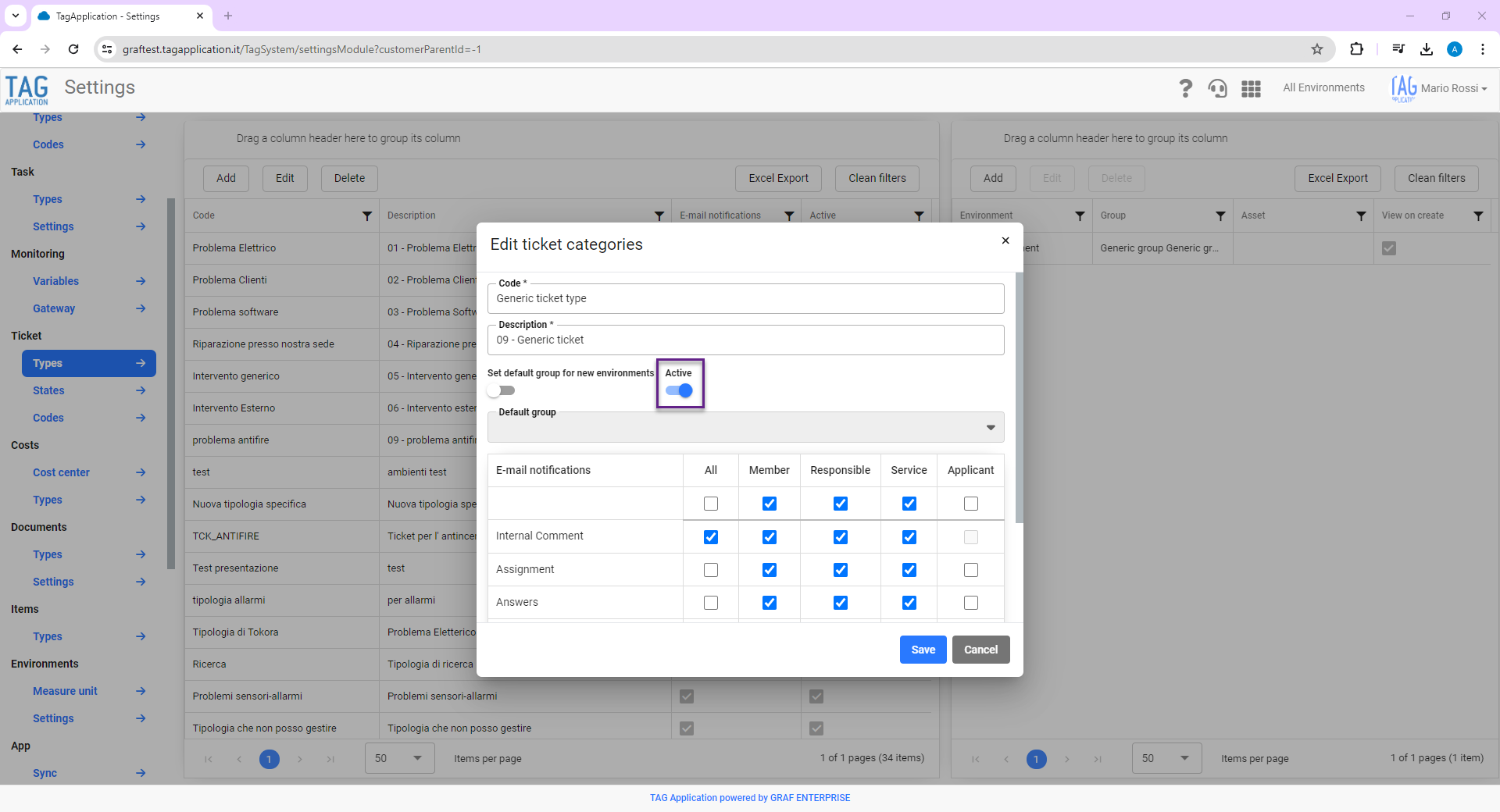
By accessing the “Ticket-Typologies” section from the Settings module, you can select a specific ticket type and turn the “Active” switch on/off as needed.
Turning the “Active” switch off will trigger the deactivation of the selected ticket type, hide it in both creation and transfer of the report,
but still allow you to always view its history from both the ticket module and consultations.
(fig 3.0)

Items – New opening detail
Do you want to allow full master data and documentation display of various items, but without allowing editing of any fields?
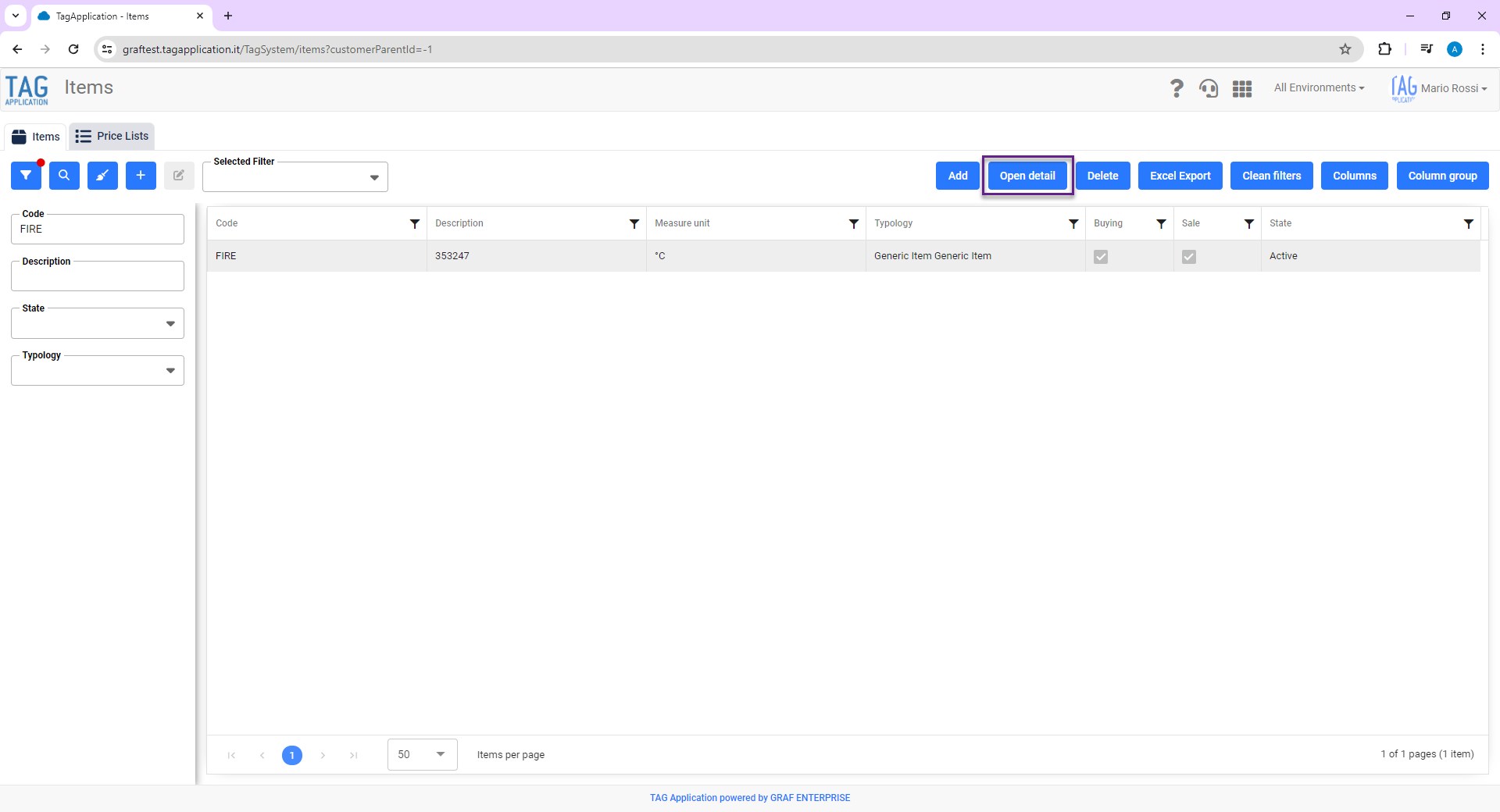
Thanks to the enhancement of the Items module you can! With the new version of TAG Application you access the complete master data of each article via the
“Open Detail” button, consult any information and can edit only if you have permission.
With TAG Application you have maximum freedom to consult and edit…only if you have permission!
(fig 4.0)
Notifications – Inserting start and end dates in task assignment notifications
Like task assignment email notifications, push notifications have also undergone the major content enhancement: with the new update, start and end dates have been integrated that are essential for immediate understanding of the work to be done.
Receive notifications directly on your smartphone and immediately understand what to do, when to do it, and who to contact if needed.
By reading any push notifications you receive, you will therefore always be able to consult them:
– Start date
– End date
– Assigned by
– Responsible
– Requestor
– Type
– Asset
– Environment
– Ticket
– Title
– Description.
Ticket – New sorting types
Nowadays there is so much information within computer systems: figuring out where to find what you need quickly and easily is essential, and TAG Application helps you do it!
Sorting data according to specific common criteria is a must: with the new update, in fact, any information to be searched within the search dropdowns will be sorted alphabetically.
No more particular, brain-teasing and misleading sorting… TAG Application simplifies and speeds up the operations of your field operators!
Task – Closing task without reading the NFC tag
As already anticipated among the web features, with the new update TAG Application becomes even more flexible, giving users the ability to decide how to use NFC technology according to their needs.
Specifically, functionality will be released that allows users to choose whether to authorize the closing of task without reading the NFC Tag associated with the asset on which they were created.
This preference, inherited in individual assets based on the settings configured on the web, will therefore allow the asset to be closed after two Tag reads (“Opening and Closing”), after a single read (“Opening”) or after none (“Never”).
In an task in which the field “Tag reading from app” is valorized with “Never” all the convenient functions of NFC technology will remain active and working, with the only difference being that when closing task there will no longer be a requirement to read the Tag.
Ticket – Deactivation types
As with the web counterpart, the new functionality regarding deactivation of ticket types will also be available for the mobile application.
Once the active and deactivated ticket types have been established, users will be able to view only the active ones on their smartphones, thus avoiding errors when opening reports.