Here are the news in version 2.14.0
Web Updates [v. 2.14.0]

How can you quickly and easily search for any information entered into the system? Well, the answer is simple… Consultations are the perfect module for performing any type of search: targeted or broad, for gathering statistics or taking specific actions.
This search power comes not only from the speed of result processing, but also — and especially — from the wide range of filters available to users for each section.
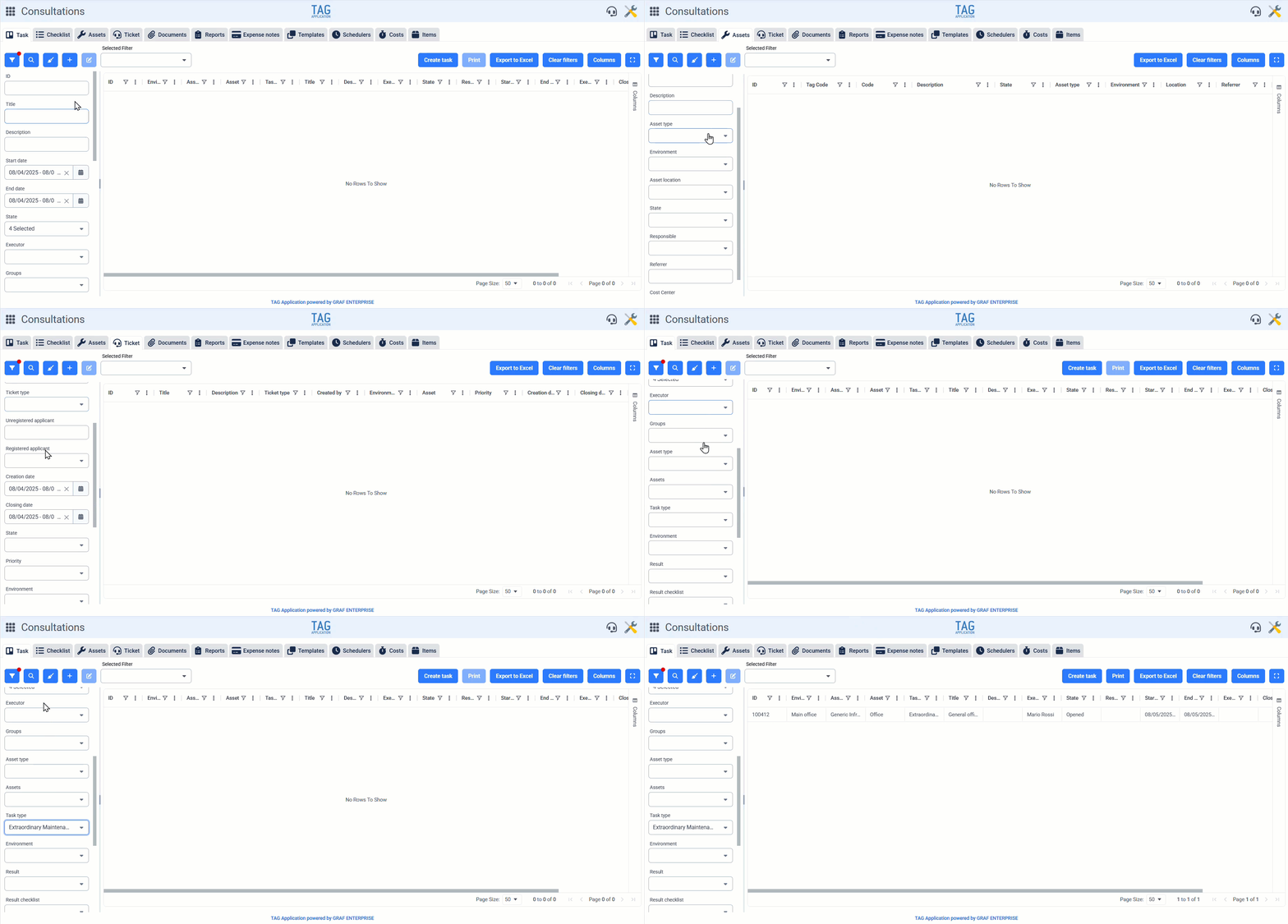
To further improve the user experience, starting from this version, pre-filters are expanded even more. Section by section, from the left panel, users can now also run the following filters:
Tasks section: Asset, Task type, and Priority.
Assets section: Location, Referrer (with suggestion feature), and Responsible.
Tickets section: Registered applicant, Unregistered applicant.
Documents section: Expiration date, Document type.
Reports section: Report number.
Expense notes section: Expense note number.
Templates section: Asset type, Asset, Task type, Created by, Creation date.
Schedulers section: Asset, Task type, Created by, Creation date.
Costs section: ID (Identifier of the entity associated with the costs).